Part 1 is sort of the Hello World on Smooks, and how it is better then using plain XSLT.
Smooks is fragment based data transformation framework. It can handle many different data formats and is the default transformation engine of three open source ESBs: (
JBossESB,
Synapse and
Mule ESB). In this case I needed an XML2XML transformation. I'm used to using XSLT for that, but I had some date formatting to do, so I figured I would use Smooks. Currently the latest release is v1.0.1, so this is what I used. Note that some of the documentation on the Smooks website already referring the v1.1.x version (you can tell by the xsd reference, smooks-1.1.xsd), so watch out for that since that will
not work using 1.0.x. However you can still use v1.0.x notation in v1.1. x
So how to go get started?
1. First you will need to
download the Smooks Libraries, but if you're like me and use JBossESB, then you can skip this step. Note that Smooks is very modular, so if you don't need all the features you'll only need a subset of the jars provided by Smooks.
2. Create a transformation unittest, like the one below to test your transformation. I based this one on the one given in the
Smook User Guide, the one at the very end of the document).
package com.sermo.services.foley.transform;

import java.io.FileInputStream;
import java.io.FileNotFoundException;
import java.io.FileWriter;
import java.io.IOException;
import java.io.InputStream;
import java.io.InputStreamReader;
import java.io.StringReader;
import java.io.StringWriter;
import java.io.Writer;

import javax.xml.transform.stream.StreamResult;
import javax.xml.transform.stream.StreamSource;

import org.custommonkey.xmlunit.XMLAssert;
import org.custommonkey.xmlunit.XMLUnit;
import org.junit.BeforeClass;
import org.junit.Test;
import org.milyn.Smooks;
import org.milyn.container.ExecutionContext;
import org.milyn.event.report.HtmlReportGenerator;
import org.milyn.payload.JavaSource;
import org.xml.sax.SAXException;

/**
 * Unit test for Smooks transformation.
 *
 * Smooks configuration file is located in src/main/resources/smooks-config.xml
 * Input file for transformation is located in src/test/resouces/input.xml
 * Expected file from trasformation is located in src/test/resouces/expected.xml
 * Smooks execution report will be created in target/smooks-report.html
 */
public class SmooksTest {

 public static Smooks smooks = null;

    @BeforeClass
    public static void setupSmooks() throws SAXException, IOException
    {
     smooks = new Smooks( "smooks-res.xml");
    }
    @Test
    public void testTransformation()
    throws FileNotFoundException, IOException, SAXException
    {
     InputStream in = this.getClass().getResourceAsStream("/input.xml");
     System.out.println(new InputStreamReader(in).toString());
     StreamSource source = new StreamSource(this.getClass().getResourceAsStream("/input.xml"));
     ExecutionContext executionContext = smooks.createExecutionContext();
        //create smooks report
        Writer reportWriter = new FileWriter( "smooks-report.html" );
        executionContext.setEventListener( new HtmlReportGenerator( reportWriter ) );
        StreamResult result = new StreamResult( new StringWriter() );
        smooks.filter( source, result, executionContext );
        System.out.println("Smooks output:" + result.getWriter().toString());
        InputStream is = this.getClass().getResourceAsStream("/expected.xml");
        //compare the expected xml (src/test/resources/expected.xml) with the transformation result.
        XMLUnit.setIgnoreWhitespace( true );
        XMLAssert.assertXMLEqual(new InputStreamReader(is), new StringReader(result.getWriter().toString()));
    }
}
In this case it transforms the XML in the
input.xml file into a format that should correspond to the XML in the
expected.xml file. The actual transformation happens at line 55 (smooks.filter), and the result can be accessed using a StreamResult called
result. XMLAssert is used to check that the output corresponds to our expectation.
3. Smooks has one configuration file, the
smooks-res.xml file, in which you define the
smooks-resource-list, and any entry in this list is a
resource-config entry. This file contains the definition of the transformation:
<?xml version='1.0' encoding='UTF-8'?>
<smooks-resource-list xmlns="http://www.milyn.org/xsd/smooks-1.0.xsd" >

    <resource-config selector="global-parameters">
        <param name="default.serialization.on">false</param>
        <param name="stream.filter.type">SAX</param>
    </resource-config>

    <!--  Date Parser used by all the bean populators -->
    <resource-config selector="decoder:UTCDateTime">
        <resource>org.milyn.javabean.decoders.DateDecoder</resource>
        <param name="format">yyyy-MM-dd HH:mm:ss</param>
    </resource-config>

    <resource-config selector="hibernate-event">
    <resource>org.milyn.javabean.BeanPopulator</resource>
    <param name="beanId">eventType</param>
    <param name="beanClass">java.util.HashMap</param>
    <param name="bindings">
        <binding property="type"  selector="hibernate-event/@eventType" />
    </param>
    </resource-config>

    <resource-config selector="category">
        <resource>org.milyn.javabean.BeanPopulator</resource>
        <param name="beanId">category</param>
        <param name="beanClass">java.util.HashMap</param>
        <param name="bindings">
            <binding property="name"       selector="category/name" />
            <binding property="type"       selector="category/type" />
            <binding property="id"         selector="category/id" />
            <binding property="createDate" selector="category/createDate" type="UTCDateTime" />
        </param>
    </resource-config>

    <resource-config selector="category">
        <resource type="ftl">
            <![CDATA[<caffeine-event type="${eventType.type}">
                     <category>
        <cat-name>${category.name}</cat-name>
        <cat-type>${category.type}</cat-type>
        <id type="integer">${category.id}</id>
        <utc-date><#if category.createDate?exists>${category.createDate?string("yyyy-MM-dd'T'HH:mm:ss'Z'")}</#if></utc-date>
      </category>
     </caffeine-event>]]>
        </resource>
    </resource-config>

</smooks-resource-list>
Note that the first sections sets up some global parameters like which parser it should be using under the hood (SAX in this case). Next I defined a date parser called 'decoder:UTCDateTime' which can parse the date format in the input.xml, so that it can be transformed into another date format later. The next two sections set up two Java beans (using a HashMap actually), so we can add name, value pairs. The first bean selects data on the 'hibernate-event' tag, setting the
type, by selecting the value of
eventType attribute. The second section populates another HashMap by looking at the data in the
category element. This is what Smooks means with being fragment based. You can use different types of technologies to parse your incoming message (XML in this case). Finally in the last section it builds the output message. Here I chose to use
FreeMarker (ftl), which is very nice templating language.
4. input.xml
<hibernate-event eventType="create">
 <category>
  <name>Sumatra</name>
  <type>Coffee Bean</type>
  <id type="integer">5000</id>
  <createDate>2009-02-09 21:00:01</createDate>
 </category>
</hibernate-event>
This is the incoming XML message.
5. expected.xml
<caffeine-event type="create">
 <category>
  <cat-name>Sumatra</cat-name>
  <cat-type>Coffee Bean</cat-type>
  <id type="integer">5000</id>
  <utc-date>2009-02-09T21:00:01Z</utc-date>
 </category>
</caffeine-event>
This is the XML we want to transform the input.xml to. So this file is the expected output, so we can use
XMLUnit to assert that we got what we were expecting.
6. Smooks Execution Report
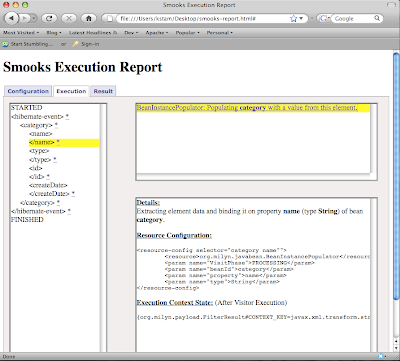
When you are in the middle of building your smooks-res.xml, the Smooks Execution Report can come in very handy for debugging purposes. The lines
//create smooks report
Writer reportWriter = new FileWriter( "smooks-report.html" );
executionContext.setEventListener( new HtmlReportGenerator( reportWriter ) );
create an HTML based report called '
smooks-report.html', which you can simply open in your favorite browser.
ConclusionFragment based transformation rocks, have you ever tried to do any date manipulation or working on a highly normalized XML in XSLT? By the way you can still use XSLT instead of a BeanPopulator; mix and match. I also like having a real templating language to create my outgoing message. By picking the tool for the task you can expect high transformation performance. There was nice thread on theServerSide on that
here.
Part 2, will be about how a Java2XML transformation and how you'd deploy the transformation as a service to JBossESB.


