Showing posts with label JBossESB. Show all posts

Tuesday, February 17, 2009

Using Regexp in Drools 5

I've spend waaay too much time on this, so I need to scribble this 'note to self'. I'm working with JBossESB and I have a piece of text in the body of the message. Now if a certain word is found in this text I want to route the message a certain way. This example is based on the simple_cbr quickstart.

1. So let's first take a look how to match a word in a string. To demonstrate how to do this I created this logging rule:

rule "Logging"
when
b: String(this matches "(?i).*Order(.|\n|\r)*" && this matches ".*EST(.|\n|\r)*")
then
System.out.println("b=|" + b + "|");
end

This rule will print out the incoming string if both the words 'Order' and 'EST' are matched.
The (?i) means 'ignore case', .*Order*. means the word 'Order' or 'order' anywhere in the string will be matched, but this will still not work if the string is multi-line (The '.' character does not match the newline character). So to fix that we need to make it .*Order(.|\n)*. Same story for the '\r'. This is the first word match which we can combine with '&&' or '||' with other matches like I did here looking for 'EST'.

2. Finally to push the String from the default place in the ESB message into the rules engine you need to use an object path of "body.'org.jboss.soa.esb.message.defaultEntry'" as shown in the XML fragment taking from a jboss-esb.xml.


<action class="org.jboss.soa.esb.actions.ContentBasedRouter" name="ContentBasedRouter">
<property name="ruleSet" value="ShippingRules.drl"/>
<property name="ruleReload" value="true"/>
<property name="object-paths">
<object-path esb="body.'org.jboss.soa.esb.message.defaultEntry'" />
</property>
<property name="destinations">
<route-to destination-name="express" service-category="ExpressShipping" service-name="ExpressShippingService"/>
<route-to destination-name="normal" service-category="NormalShipping" service-name="NormalShippingService"/>
</property>
</action>

alternatively you can use a path of esb="BODY_CONTENT".

Saturday, September 27, 2008

Transformation using Smooks, part 1: XML2XML

Part 1 is sort of the Hello World on Smooks, and how it is better then using plain XSLT.

Smooks is fragment based data transformation framework. It can handle many different data formats and is the default transformation engine of three open source ESBs: (JBossESB, Synapse and Mule ESB). In this case I needed an XML2XML transformation. I'm used to using XSLT for that, but I had some date formatting to do, so I figured I would use Smooks. Currently the latest release is v1.0.1, so this is what I used. Note that some of the documentation on the Smooks website already referring the v1.1.x version (you can tell by the xsd reference, smooks-1.1.xsd), so watch out for that since that will not work using 1.0.x. However you can still use v1.0.x notation in v1.1. x

So how to go get started?

1. First you will need to download the Smooks Libraries, but if you're like me and use JBossESB, then you can skip this step. Note that Smooks is very modular, so if you don't need all the features you'll only need a subset of the jars provided by Smooks.

2. Create a transformation unittest, like the one below to test your transformation. I based this one on the one given in the Smook User Guide, the one at the very end of the document).

package com.sermo.services.foley.transform;

import java.io.FileInputStream;
import java.io.FileNotFoundException;
import java.io.FileWriter;
import java.io.IOException;
import java.io.InputStream;
import java.io.InputStreamReader;
import java.io.StringReader;
import java.io.StringWriter;
import java.io.Writer;

import javax.xml.transform.stream.StreamResult;
import javax.xml.transform.stream.StreamSource;

import org.custommonkey.xmlunit.XMLAssert;
import org.custommonkey.xmlunit.XMLUnit;
import org.junit.BeforeClass;
import org.junit.Test;
import org.milyn.Smooks;
import org.milyn.container.ExecutionContext;
import org.milyn.event.report.HtmlReportGenerator;
import org.milyn.payload.JavaSource;
import org.xml.sax.SAXException;

/**
* Unit test for Smooks transformation.
*
* Smooks configuration file is located in src/main/resources/smooks-config.xml
* Input file for transformation is located in src/test/resouces/input.xml
* Expected file from trasformation is located in src/test/resouces/expected.xml
* Smooks execution report will be created in target/smooks-report.html
*/
public class SmooksTest {

public static Smooks smooks = null;

@BeforeClass
public static void setupSmooks() throws SAXException, IOException
{
smooks = new Smooks( "smooks-res.xml");
}
@Test
public void testTransformation()
throws FileNotFoundException, IOException, SAXException
{
InputStream in = this.getClass().getResourceAsStream("/input.xml");
System.out.println(new InputStreamReader(in).toString());
StreamSource source = new StreamSource(this.getClass().getResourceAsStream("/input.xml"));
ExecutionContext executionContext = smooks.createExecutionContext();
//create smooks report
Writer reportWriter = new FileWriter( "smooks-report.html" );
executionContext.setEventListener( new HtmlReportGenerator( reportWriter ) );
StreamResult result = new StreamResult( new StringWriter() );
smooks.filter( source, result, executionContext );
System.out.println("Smooks output:" + result.getWriter().toString());
InputStream is = this.getClass().getResourceAsStream("/expected.xml");
//compare the expected xml (src/test/resources/expected.xml) with the transformation result.
XMLUnit.setIgnoreWhitespace( true );
XMLAssert.assertXMLEqual(new InputStreamReader(is), new StringReader(result.getWriter().toString()));
}
}

In this case it transforms the XML in the input.xml file into a format that should correspond to the XML in the expected.xml file. The actual transformation happens at line 55 (smooks.filter), and the result can be accessed using a StreamResult called result. XMLAssert is used to check that the output corresponds to our expectation.

3. Smooks has one configuration file, the smooks-res.xml file, in which you define the smooks-resource-list, and any entry in this list is a resource-config entry. This file contains the definition of the transformation:

<?xml version='1.0' encoding='UTF-8'?>
<smooks-resource-list xmlns="http://www.milyn.org/xsd/smooks-1.0.xsd" >

<resource-config selector="global-parameters">
<param name="default.serialization.on">false</param>
<param name="stream.filter.type">SAX</param>
</resource-config>

<!-- Date Parser used by all the bean populators -->
<resource-config selector="decoder:UTCDateTime">
<resource>org.milyn.javabean.decoders.DateDecoder</resource>
<param name="format">yyyy-MM-dd HH:mm:ss</param>
</resource-config>

<resource-config selector="hibernate-event">
<resource>org.milyn.javabean.BeanPopulator</resource>
<param name="beanId">eventType</param>
<param name="beanClass">java.util.HashMap</param>
<param name="bindings">
<binding property="type" selector="hibernate-event/@eventType" />
</param>
</resource-config>

<resource-config selector="category">
<resource>org.milyn.javabean.BeanPopulator</resource>
<param name="beanId">category</param>
<param name="beanClass">java.util.HashMap</param>
<param name="bindings">
<binding property="name" selector="category/name" />
<binding property="type" selector="category/type" />
<binding property="id" selector="category/id" />
<binding property="createDate" selector="category/createDate" type="UTCDateTime" />
</param>
</resource-config>

<resource-config selector="category">
<resource type="ftl">
<![CDATA[<caffeine-event type="${eventType.type}">
<category>
<cat-name>${category.name}</cat-name>
<cat-type>${category.type}</cat-type>
<id type="integer">${category.id}</id>
<utc-date><#if category.createDate?exists>${category.createDate?string("yyyy-MM-dd'T'HH:mm:ss'Z'")}</#if></utc-date>
</category>
</caffeine-event>]]>
</resource>
</resource-config>

</smooks-resource-list>

Note that the first sections sets up some global parameters like which parser it should be using under the hood (SAX in this case). Next I defined a date parser called 'decoder:UTCDateTime' which can parse the date format in the input.xml, so that it can be transformed into another date format later. The next two sections set up two Java beans (using a HashMap actually), so we can add name, value pairs. The first bean selects data on the 'hibernate-event' tag, setting the type, by selecting the value of eventType attribute. The second section populates another HashMap by looking at the data in the category element. This is what Smooks means with being fragment based. You can use different types of technologies to parse your incoming message (XML in this case). Finally in the last section it builds the output message. Here I chose to use FreeMarker (ftl), which is very nice templating language.

4. input.xml

<hibernate-event eventType="create">
<category>
<name>Sumatra</name>
<type>Coffee Bean</type>
<id type="integer">5000</id>
<createDate>2009-02-09 21:00:01</createDate>
</category>
</hibernate-event>

This is the incoming XML message.

5. expected.xml

<caffeine-event type="create">
<category>
<cat-name>Sumatra</cat-name>
<cat-type>Coffee Bean</cat-type>
<id type="integer">5000</id>
<utc-date>2009-02-09T21:00:01Z</utc-date>
</category>
</caffeine-event>

This is the XML we want to transform the input.xml to. So this file is the expected output, so we can use XMLUnit to assert that we got what we were expecting.

6. Smooks Execution Report
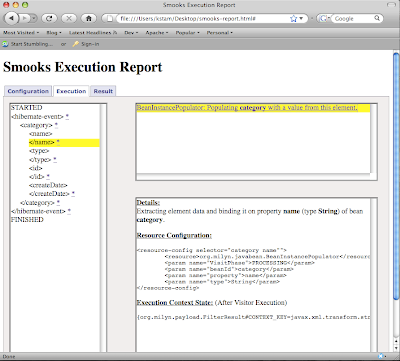
When you are in the middle of building your smooks-res.xml, the Smooks Execution Report can come in very handy for debugging purposes. The lines

//create smooks report
Writer reportWriter = new FileWriter( "smooks-report.html" );
executionContext.setEventListener( new HtmlReportGenerator( reportWriter ) );

create an HTML based report called 'smooks-report.html', which you can simply open in your favorite browser.


Conclusion

Fragment based transformation rocks, have you ever tried to do any date manipulation or working on a highly normalized XML in XSLT? By the way you can still use XSLT instead of a BeanPopulator; mix and match. I also like having a real templating language to create my outgoing message. By picking the tool for the task you can expect high transformation performance. There was nice thread on theServerSide on that here.

Part 2, will be about how a Java2XML transformation and how you'd deploy the transformation as a service to JBossESB.

Monday, March 17, 2008

NEJUG on SOA - The SOA-P Store: Bed, Bath and Beyond (II)

I'm happy to say that the presentation went over well. We got some great questions and in general I think people really got it. Tom Cunningham compiled a list of the questions we got:

Is the registry different than UDDI?
Is there portability across ESB implementations (Mule / Service Mix / JBoss)?
Is there portability across different BPEL providers?
When you are talking about components for ESB, are you talking about adapters?
How gunshy should I be using JBoss ESB (are people using it in production)?
What strategies can I use for portability between ESB providers?
Is there any inherent security in the content based routing? Are there plans on adding something in this area (ACEGI/Spring Security in particular)?
What would you typically see in an actions block?
Would an example of an action be something execuing a rule?
When do you use a J2EE Servlet Filter approach and when would you use ESB?
How would you roll back a transaction?
How do you integrate with RESTful services?
How tightly couple is the rules engine with the ESB?
What monitoring tools exist to see what is going on inside the ESB?
Is there a way inside the ESB to log payload in and out of the ESB?
Is the ESB's state recoverable? Will it maintain state?
How do you track long transactions?
What's the connection between Rules and the ESB?
Will hot deploy consume all current requests before redeploying?
Is load balancing simple round robin?
Does JBPM compete with BPEL?
Is there interactive debugging so that you can step through the JPDL flow?
Are the enterprise design patterns (wiretap, splitter, aggregatore) available inside of a visual designer in JBDS?
Is the JBPM plugin going to be available for NetBeans?
Who is the jbpm-console intended for?
What's the difference between SOA and ESB?
How do you migrate to ESB?

The most humorous question had to be the last one, where someone wanted to know if content based routing could be used as a method of escaping hardware licenses.


Sorry, you had to be there for the answers, but maybe it can be a start for a JBossESB FAQ page.

Monday, March 10, 2008

NEJUG on SOA - The SOA-P Store: Bed, Bath and Beyond

This Thursday (March 13th) Burr Sutter and I will speak at the NEJUG on SOA "The SOA-P Store: Bed, Bath and Beyond".

This will be a dynamic session focused on the demonstration of the customary capabilities and best practices associated with an Enterprise Service Bus for SOA-focused deployment.

We will get people involved and empowered with real boots-on-the-ground knowledge of how to do SOA and not just pontificate on abstract theory and marketing-speak. The live demonstrations will illustrate how typical Struts+Spring+Hibernate web applications can be liberated as services and enter the world of ESB & SOA.

See you there.

JBoss SOA Platform (SOA-P) Documentation

The SOA-P team incorporates a team of technical writers who take the project specific documentation and turn it into documentation for the SOA Platform, which is the supported 'RHEL' version of JBossESB (where JBossESB would be Fedora). In the true spirit of Open Source, this documentation is available for free, under the support/documentation tab of the Red Hat homepage, or you can go directly to the SOA-P 4.2 docs. I was quite impressed with what they did to some of the docs I wrote! Thanks guys.

Service Orchestration using jBPM

I recently wrote up am entry in the JBossESB blog. This code is now available in the SOA Platform as well as on the trunk of the JBossESB project. For the full documentation in pdf format see the jBPMIntegrationGuide.


Figure 1. Service Integration using jBPM.

Wednesday, January 30, 2008

Switch jUDDI on JBossESB over to Postgres

By default JBossESB uses HSQL to handle persistence for jUDDI. For production it is recommended to switch it to for example Postgres.

1. First you will need to download the Postgres JDBC driver. I selected the '8.2-507 JDBC 2EE' driver. You can copy it to either the jboss_home/server/default/lib directory, or to the jbossesb.sar/lib directory.

2. Create the juddi database. Run the pgAdmin a shown in Figure 1.


Figure 1. The Postgres Admin

and create a juddi user, which has create rights to create tables, see Figure 2.


Figure 2. Add a user called 'juddi'


3. Next you should update the datasource for jUDDI, which is defined in the jbossesb.sar/juddi-ds.xml. Comment out the Hypersonic configuration and add the postgres datasource configuration like


4. Finally we have to tell jUDDI where it can find the DDL to create the juddi schema. For this we edit the jbossesb.sar/esb.juddi.xml. Modify the 'juddi.sqlFiles' setting by replacing the 'hsqldb' occurances to 'postgresql'.


Now on startup JBossESB will create the jUDDI tables in the Postgres juddi database.

For an overview of jUDDI in JBossESB in pdf format see the Registry Guide.

Friday, January 25, 2008

jBPM ant task to deploy a process definition to a running server

I've been working on jBPM integration into JBossESB to do Service Orchestration, and I created a new ant task to deploy a process definition to a running instance of jBPM. When I say a running instance I mean an instance that deploys the jBPM-console. The jBPM-console ships with a DeployerServlet which is used by the jBPM eclipse plugin to deploy process definitions. The ant task is called "DeployProcessToServerTask" and it uses the very same servlet. The java code for the task has been attached to jira JBPM-1117 so it should hopefully make it into SVN soon.

To use the DeployProcessToServer Task you need to define a new task using the taskdef command

<taskdef name="deployToServer" classname="org.jbpm.ant.DeployProcessToServerTask">
<classpath refid="exec-classpath"/>
</taskdef>

So here I defined a task called 'deployToServer', but you can call it whatever you want. The classpath should obviously point to the jar containing this class. The 'deployToServer' can either deploy a Process Archive (PAR), which is a zip file containing the files you want to deploy, or you can specify a set of files which it will zip up and deploy for you. You can use the following attributes and subelements:


Attribute DescriptionDefault value
processThe location of process archive-
servernameThe name of the server which is used to build the deployment urllocalhost
serverportThe port to which the http protocol is bound8080
serverdeployerThe address of the deployer servlet/jbpm-console/upload
debugDebug flag which, if set, writes out a debug.par zip file. This is especially useful if fileSet subelements are used, so you can check what gets loaded to the server-
SubElement DescriptionDefault value
fileSetA fileSet element-


The following xml fragment deploys all the files in the processDefinition directory to the server

<target name="deployProcess" description="deploys the process definition">
<echo>Deploy the process definition</echo>
<taskdef name="deployToServer" classname="org.jbpm.ant.DeployProcessToServerTask">
<classpath refid="exec-classpath"/>
</taskdef>
<deployToServer>
<fileset dir="${basedir}/processDefinition" includes="*"/>
</deployToServer>
</target>

Or if you already have a par archive ready to go you could reference that

<target name="deployProcess" description="deploys the process definition">
<echo>Deploy the process definition</echo>
<taskdef name="deployToServer" classname="org.jbpm.ant.DeployProcessToServerTask">
<classpath refid="exec-classpath"/>
</taskdef>
<deployToServer process="${build}/process.par"/>
</target>